Firmware Update - CHAdeMO Charging Adapter
Correction code 5001100350011003
CAN Setup
- Connect the USB-CAN dongle to a laptop that is equipped with Toolbox.
- Connect the CHAdeMO CAN programming connector to the USB-CAN dongle.
- Connect the CHAdeMO CAN programming connector to an external 12V power supply.
- Connect the CHAdeMO CAN programming connector to the CHAdeMO charging adapter.
| 1 | Connect the USB-CAN dongle to a laptop that is equipped with Toolbox. |
| 2 | Connect the CHAdeMO CAN programming connector to the USB-CAN dongle. |
| 3 | Connect the CHAdeMO CAN programming connector to an external 12V power supply. |
| 4 | Connect the CHAdeMO CAN programming connector to the CHAdeMO charging adapter. |
Firmware Update
Note: It is not necessary to connect the diagnostic cable to the vehicle.
-
In the bottom left corner of the screen, click the gray circle on the right. A
popup box appears:
- In the Vehicle field, select Tesla CHAdeMO Adapter.
- In the Bus field, select SE.
- Ensure that the Enable Diagnostics box is checked.
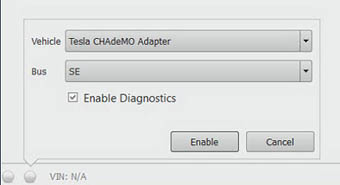
| 1 | In the bottom left corner of the screen, click the gray circle on the right. A
popup box appears:
| |
| 2 | Click Enable. | ||
| 3 | In Toolbox, select . Note: If the CHAdeMO Adapter Firmware Update button is not present:
| ||
| 4 | Click the Start/Play button and follow the onscreen instructions. |